What are pull / push?
Retrieving from a Git repository is called pulling.
The operation of uploading code from the local machine to a remote location is called pushing.
To push, the add and commit operations are required, so we will look at the differences between these operations.
local vs remote
First, to understand Git, you need to know about these two: the local repository and the remote repository.
The remote repository is called remote, and what is on my PC is called local.
What is add?
The operation of listing the files to be uploaded from local is called git add.
commit vs push
The operation of recording changes to the local repository for files that have been added is called commit, and a message can be added.
The operation of sending changes from local to remote is called push.
Terminology
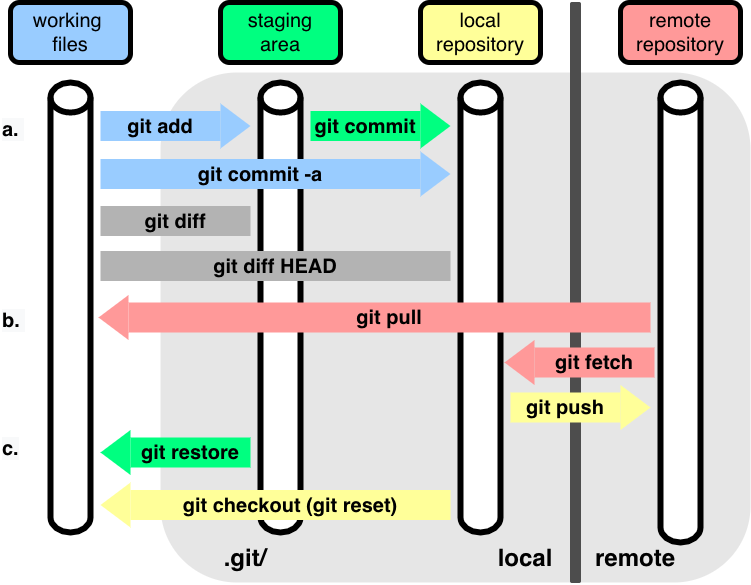
- add It is used to collect changes until the next change is recorded. Therefore, until a record is explicitly made through the git commit command, running the git add command any number of times has no effect on the change history of the Git repository.
- commit : Record the changes in the local repository ex) my computer
- push : Record the changes in the remote repository ex) GitHub
Status
git status is a command that is always used together when using the git add command. git status is used to check the status of the working directory and staging area.
Staging Area
The staging area is a concept that must be understood when using the git add command. The staging area serves as a bridge between the working directory and the change history of the Git repository. Using the git add command, you can move all or some of the changes currently in the working directory to the staging area. Separating the working directory and staging area has the advantage that, when recording change history, you can record the changes in the working directory little by little instead of recording everything at once.
pull vs fetch
It is much like the difference between commit and push. Both are used to retrieve the contents of a remote repository.
fetch
fetch is a command that lets you check whether to merge files from the remote repository before merging them.
pull
It is a command that brings changes from the remote repository into the local repository and merges them. Unlike fetch, it merges the changes into the local directory.
fetch vs pull
fetch does not affect the local repository with the retrieved changes, and it is best used to review them before merging. pull merges the retrieved changes into the local repository. However, conflicts may occur if you pull changes after working locally.
pull request
A GitHub Pull Request refers to a request to merge changes from a repository created by another user.
Here, go follow along with the GitHub practice uploaded by GOAT (Greatest Of All Time) Seongsu hyung~~ Nice explanation Simple git guide
References https://velog.io/@termblur/git-add-commit-push-%EC%B0%A8%EC%9D%B4 https://thenicesj.tistory.com/506 pull vs fetch