
How can I quickly remove rows containing a specific value without using a for loop?
drop() can become slower as the dataframe grows, so this is another method I found.
This method is called the boolean mask technique.
import pandas as pd

# 랜덤 데이터프레임 생성
df = pd.DataFrame({
   '무': [1, 2, 3, 4, 5],
   '야': [5, 15, 10, 20, 15],
   '호': [10, 15, 10, 20, 15],
   '테': [10, 15, 10, 20, 15],
   '스': [10, 15, 10, 20, 15]
})

# 삭제하려는 값들을 포함하는 리스트
values = [2, 4, 6, 8, 10]

# 리스트의 값들이 데이터프레임의 어떤 열에 있는지 확인
mask = df.isin(values)

# 리스트의 값들이 있는 행을 삭제
df = df[~mask.any(axis=1)]

print(df)
Brief Code Explanation
- Create a values list containing the values you want to delete.
- Use the df.isin() method to check whether each element of the df dataframe matches one of the values in the list. It returns
Truefor matches andFalseotherwise, converting the result into a dataframe and storing it in the mask variable.
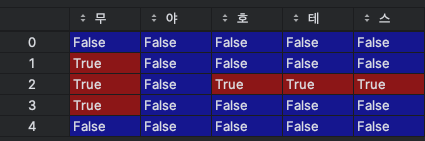
-
Then, negate this mask to delete the rows containing the values in the list. To do this, use the
~operator to invert the values in the mask. This makes the rows containing the values in the listFalse, while the other rows becomeTrue. -
Finally, use the
any(axis=1)function to check whether at least one element isTruefor each row. This deletes the rows containing the values in the list.